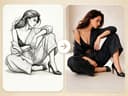
Fast Image AI Sketch to Image is a free online tool that converts hand-drawn sketches, line art, or simple drawings into detailed AI-generated images using user-provided text prompts.
What is Fast Image AI Sketch to Image?
It is an AI-powered generator that takes a sketch (uploaded image) and a text prompt as inputs, then outputs a finished image with colors, textures, lighting, and details. The tool runs entirely in the browser on the Fast Image AI web platform, requires no software installation, and is designed for both beginners and professionals. It is developed by Fast Image AI.
Key Features
- Turn Sketches into AI Images – Upload any rough sketch, line art, or hand-drawn drawing and receive a polished AI-generated image with full color and shading.
- Preserve Original Structure – The AI maintains the main shape, composition, and layout of your sketch so the output stays true to your initial idea.
- Prompt-Driven Style Control – Describe the desired style, colors, lighting, materials, and background in a text prompt to guide the final look.
- No Design Skills Required – No artistic expertise is needed; you can start with a simple scribble and let the AI complete the visual details.
- Free Tier with Paid Upgrades – A free credit-based tier is available; paid subscription plans (Basic, Pro, Pro Max) offer 200, 600, or 1200 credits per month respectively, with priority processing and commercial usage rights.
- Commercial License Included – All subscription plans grant a commercial license for the generated images, allowing use in products, marketing, or client work.
Who is it for?
- Product designers – Turn a rough product sketch into a photorealistic concept image for client presentations or iteration.
- Character and concept artists – Convert line drawings of characters or creatures into fully colored, shaded illustrations with specific style prompts.
- Game and animation artists – Quickly generate environment concepts, props, or asset references from simple sketches.
- Interior designers and architects – Upload hand-drawn floor plans or room layouts and receive realistic rendered visuals with furnishings and lighting.
- Social media creators and hobbyists – Transform doodles or napkin sketches into shareable, polished images without any design software.
What can you do with Fast Image AI Sketch to Image?
- Product concept visualization: Upload a rough product sketch and add a prompt describing materials, colors, and lighting to get a photorealistic concept image.
- Character design: Turn a simple line drawing of a character into a fully colored, shaded illustration with style prompts for fantasy, sci-fi, or realistic looks.
- Interior design mockups: Upload a hand-drawn room layout and generate a realistic interior rendering with furniture, decor, and lighting effects.
How does it work?
- Open the Fast Image AI workspace in your browser.
- Upload or drag-and-drop your sketch (any common image format).
- Enter a text prompt describing the style, details, colors, and background you want.
- The AI generates a complete image based on your sketch and prompt.
- Download the final AI image instantly in high resolution.
Pricing
Fast Image AI offers a free tier with limited credits (exact amount not specified on the page) and three paid subscription plans billed yearly with a 30% discount: Basic at $9.90/month (200 credits), Pro at $19.90/month (600 credits), and Pro Max at $29.90/month (1200 credits). All plans include unlimited image downloads, access to all AI tools, priority processing, and a commercial license.
FAQ
Can I upload a hand-drawn sketch?
Yes, the tool accepts any simple drawing, line art, or hand-drawn sketch as input.
Will the AI keep the original sketch structure?
Yes, the AI follows the main shape, structure, and composition of your sketch, preserving your original idea while adding details.